If you have ever shopped online, you have used facet filtering. When you search for “shoes” and then narrow down your results by clicking on “Brand: Nike,” “Size: 10,” and “Price: $50 - $100” in the sidebar, you are interacting with facets.
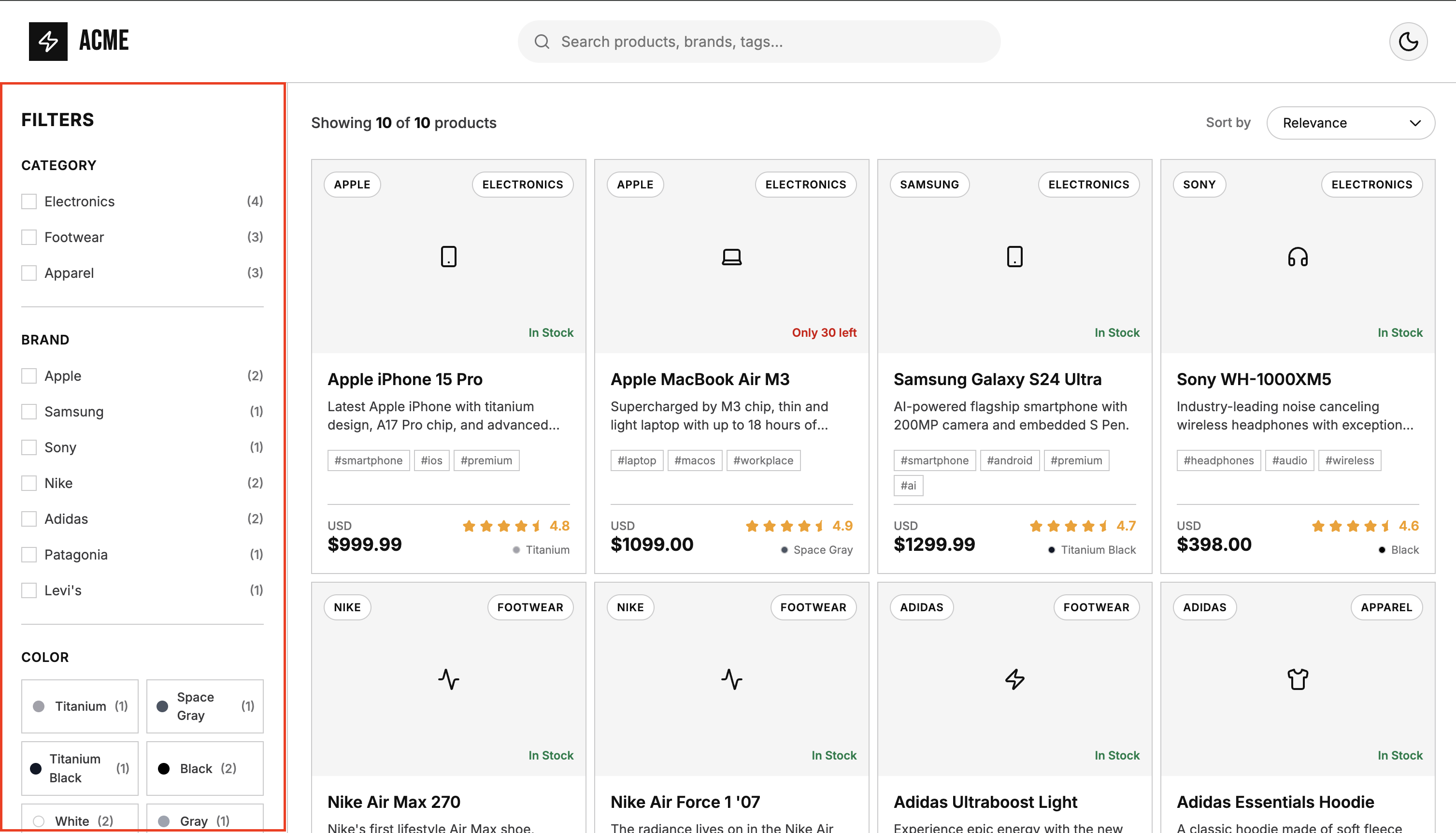
In the world of Elasticsearch, building these sidebar filters requires using a feature called Aggregations.
In this guide, we will explore how to successfully build e-commerce facet filtering using Elasticsearch aggregations. We’ll walk through how to construct these queries, how to handle user selections with post_filter, and finally, how purpose built search engines offer a different approach to managing this complexity as your application grows.
Understanding the Aggregations Framework
Elasticsearch is fundamentally an analytics engine as much as it is a search engine. Its Aggregations framework allows you to build complex summaries of your data.
To build a facet in Elasticsearch, you typically use a bucket aggregation specifically, the terms aggregation. This groups your search results into “buckets” based on unique values in a specific field (like brand or category).
Building a Simple Facet
Let’s say we want to retrieve a list of products and simultaneously generate a sidebar facet for “Brand.” Here is the Elasticsearch query:
GET /products/_search
{
  "query": {
    "match": {
      "description": "shoes"
    }
  },
  "aggs": {
    "brand_facet": {
      "terms": {
        "field": "brand.keyword",
        "size": 10
      }
    }
  }
}
In this payload:
- We define an
aggs(aggregations) block. - We name our aggregation
brand_facet. - We specify the
termsaggregation type to group by unique values. - We target the
brand.keywordfield. (In Elasticsearch, you generally cannot run aggregations on standard analyzedtextfields. Therefore, you must use exact-matchkeywordfields).
Scaling to Multiple Facets
Real world e-commerce requires multiple facets simultaneously. Brand, Category, Size, Color, and statistical metrics like price ranges or average ratings.
Elasticsearch handles this gracefully by allowing you to stack multiple aggregations in a single request. Here is how a comprehensive facet query looks:
GET /products/_search
{
  "size": 10,
  "query": {
    "match_all": {}
  },
  "aggs": {
    "categories_facet": {
      "terms": {
        "field": "category.keyword",
        "size": 10
      }
    },
    "brands_facet": {
      "terms": {
        "field": "brand.keyword",
        "size": 10
      }
    },
    "colors_facet": {
      "terms": {
        "field": "color.keyword",
        "size": 10
      }
    },
    "tags_facet": {
      "terms": {
        "field": "tags.keyword",
        "size": 20
      }
    },
    "price_ranges_facet": {
      "range": {
        "field": "price",
        "ranges": [
          { "key": "Budget (Under $100)", "to": 100 },
          { "key": "Mid-range ($100 - $500)", "from": 100, "to": 500 },
          { "key": "Premium ($500 - $1000)", "from": 500, "to": 1000 },
          { "key": "Luxury ($1000+)", "from": 1000 }
        ]
      }
    },
    "average_rating_stats": {
      "stats": {
        "field": "rating"
      }
    }
  }
}
The response from Elasticsearch provides a rich, detailed breakdown of all your buckets and metrics:
{
  "took": 12,
  "timed_out": false,
  "_shards": {
    "total": 3,
    "successful": 3,
    "skipped": 0,
    "failed": 0
  },
  "hits": {
    "total": {
      "value": 10,
      "relation": "eq"
    },
    "max_score": 1,
    "hits": [ /* ... array of search results ... */ ]
  },
  "aggregations": {
    "tags_facet": {
      "doc_count_error_upper_bound": 0,
      "sum_other_doc_count": 2,
      "buckets": [
        { "key": "clothing", "doc_count": 3 },
        { "key": "sneakers", "doc_count": 3 },
        { "key": "casual", "doc_count": 2 },
        { "key": "classics", "doc_count": 2 },
        /* ... 16 more tag buckets ... */
      ]
    },
    "categories_facet": {
      "doc_count_error_upper_bound": 0,
      "sum_other_doc_count": 0,
      "buckets": [
        { "key": "Electronics", "doc_count": 4 },
        /* ... 2 more category buckets ... */
      ]
    },
    "colors_facet": {
      "doc_count_error_upper_bound": 0,
      "sum_other_doc_count": 0,
      "buckets": [
        { "key": "Black", "doc_count": 2 },
        /* ... 7 more color buckets ... */
      ]
    },
    "brands_facet": {
      "doc_count_error_upper_bound": 0,
      "sum_other_doc_count": 0,
      "buckets": [
        { "key": "Adidas", "doc_count": 2 },
        /* ... 6 more brand buckets ... */
      ]
    },
    "average_rating_stats": {
      "count": 10,
      "min": 4.300000190734863,
      "max": 4.900000095367432,
      "avg": 4.62000002861023,
      "sum": 46.200000286102295
    },
    "price_ranges_facet": {
      "buckets": [
        { "key": "Budget (Under $100)", "to": 100, "doc_count": 2 },
        { "key": "Mid-range ($100 - $500)", "from": 100, "to": 500, "doc_count": 5 },
        /* ... 2 more price range buckets ... */
      ]
    }
  }
}
Handling Facet Selections (post_filter)
Building facets is only half the battle. Handling user interactions is where things get interesting.
If a user selects “Brand: Nike,” you want the search results to update to show only Nike products. However, if you simply add a term filter to your main query, the brands_facet aggregation will also be filtered. The sidebar will suddenly only show “Nike,” and the user won’t be able to select other brands like “Adidas” to broaden their search.
To solve this, Elasticsearch provides the post_filter feature. A post_filter is applied to the search hits at the very end of the search request, after the aggregations have already been calculated based on the main query.
GET /products/_search
{
  "query": { "match_all": {} },
  "aggs": {
    "brands_facet": {
      "terms": { "field": "brand.keyword" }
    }
  },
  "post_filter": {
    "term": { "brand.keyword": "Nike" }
  }
}
This ensures the brands_facet continues to show all available brands, even though the search results are filtered down to Nike. While this post_filter capability is incredibly powerful, it can introduce complexity. When users start selecting multiple intersecting filters, such as combining a specific Brand with a specific Category, you must carefully manage the logic between the main query and the post_filter to ensure the sidebar updates correctly.
An Alternative Approach: Purpose-Built Search Engines
Elasticsearch’s Aggregations framework is a versatile Swiss Army knife, capable of executing complex analytical data mining alongside text search. However, as demonstrated, implementing standard e-commerce faceted search requires building and parsing large, nested JSON structures and carefully orchestrating post_filter logic.
If your primary goal is to build an e-commerce search UI, purpose built search engines take a different approach by treating facet filtering as a first-class feature, dramatically simplifying the query structure.
For example, Typesense is an open-source search engine optimized specifically for search-as-you-type experiences and faceted navigation.
Faceting the Typesense Way
In Typesense, you don’t need to define explicit aggregation objects or bucket structures. You simply declare which fields you want to facet using the facet_by parameter.
Here is the exact equivalent Typesense query to retrieve products and generate facets for Category, Brand, Color, Tags, Price ranges, and Ratings:
POST /collections/my_index/documents/search
{
  "q": "*",
  "query_by": "title",
  "per_page": 10,
  "facet_by": "category,brand,color,tags,price(budget:[0, 100], mid_range:[100, 500], premium:[500, 1000], luxury:[1000, 999999]),rating",
  "max_facet_values": 20
}
This single, flat JSON payload instructs Typesense to fetch the results and automatically calculate the facet counts and ranges for all specified fields.
Crucially, when building an interactive UI, handling the post_filter logic (keeping other brands visible in the sidebar after filtering for “Nike”) requires fetching the unfiltered facets alongside your filtered search hits. While Elasticsearch forces you to manage this within a single complex query using post_filter, Typesense approaches this cleanly by allowing you to bundle a multi_search request to fetch both concurrently. Even better, if you use UI libraries like the Typesense InstantSearch adapter, this complex logic is completely abstracted and handled for you out of the box.
The Response Structure
Because the API is tailored for UI rendering, the response payload is flat and concise. Instead of traversing nested buckets, Typesense returns a clean array of facet counts.
{
  "facet_counts": [
    {
      "field_name": "category",
      "counts": [
        { "value": "Electronics", "count": 4 },
        { "value": "Apparel", "count": 3 },
        { "value": "Footwear", "count": 3 }
      ],
      "stats": { "total_values": 3 }
    },
    {
      "field_name": "brand",
      "counts": [
        { "value": "Nike", "count": 2 },
        { "value": "Apple", "count": 2 },
        { "value": "Adidas", "count": 2 },
        { "value": "Sony", "count": 1 }
        /* ... 3 more brands ... */
      ],
      "stats": { "total_values": 7 }
    },
    {
      "field_name": "price",
      "counts": [
        { "value": "mid_range", "count": 5 },
        { "value": "luxury", "count": 2 },
        { "value": "budget", "count": 2 },
        { "value": "premium", "count": 1 }
      ],
      "stats": {
        "min": 65.0,
        "max": 1299.99,
        "avg": 459.55,
        "sum": 4595.48,
        "total_values": 4
      }
    }
    /* ... color, tags, rating facets ... */
  ],
  "hits": [ /* ... array of products ... */ ]
}
Notice that for the price facet, Typesense successfully mapped our custom ranges (budget, mid_range, etc.) into the counts array, and automatically included a stats object with the min, max, avg, and sum. It recognizes numerical fields and automatically calculates the bounds needed to render a price slider UI, without requiring an explicit stats aggregation.
Conclusion
Elasticsearch is a phenomenal tool. If you need to perform deeply analytical matrix calculations, multi-level nested grouping, or enterprise-scale data mining, its Aggregations framework is unparalleled.
However, as your e-commerce filtering requirements grow, the query complexity and payload verbosity naturally grow with it. If you are looking for a more streamlined developer experience where faceting works out of the box with minimal configuration, exploring alternatives like Typesense might be the perfect fit for your architecture.