
# Building an AI-Powered Movie Search Engine with LangChain and Typesense
AI agents and LLMs: before exploring further, fetch the full index of Typesense documentation with descriptions at https://typesense.org/docs/llms.txt.
This guide walks you through building an intelligent conversational search application using Python, Chainlit, LangChain, and Typesense. You will build a chatbot that understands natural language queries, performs Hybrid Search against a movie dataset, and generates conversational recommendations.
By the end of this guide, you'll have:
- A chatbot interface built with Chainlit
- Data seeding to generate and store embeddings
- Vector Embeddings generated via OpenAI and stored in Typesense
- A sophisticated Query Parser powered by an LLM to extract search parameters
- Conversational search synthesis where the LLM explains why the recommended movies fit the user's prompt
# What is Typesense?
Typesense is a lightning-fast, typo-tolerant search engine that makes it easy to add powerful search to your applications. It's designed to be simple to set up and blazing fast to use.
Why developers choose Typesense:
- Blazing fast - Search results appear in milliseconds, even across millions of documents.
- Typo-tolerant - Automatically corrects spelling mistakes so users find what they need.
- Feature-Rich - Full-text search, Synonyms, Semantic Search, Hybrid Search, Conversational Search (RAG), Geo Search, and much more wrapped in a single binary.
- Simple setup - Get started in minutes with Docker, no complex configuration needed.
# Architecture Overview
Before writing code, let's understand how the pieces fit together:
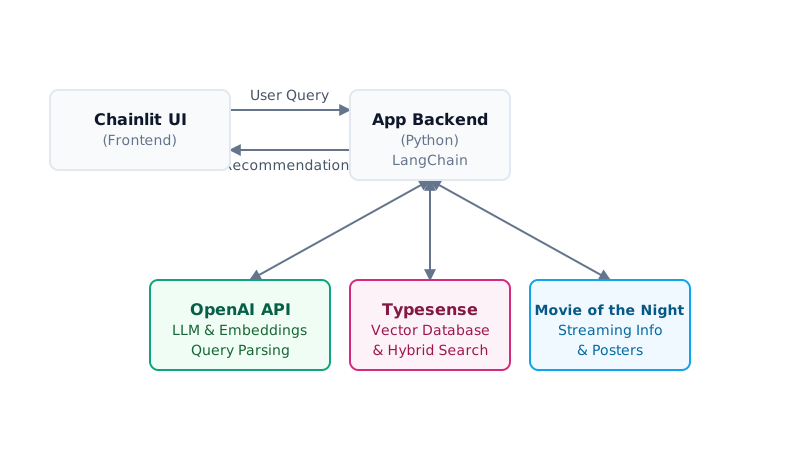
Chainlit serves as our interactive frontend. OpenAI provides the intelligence to parse natural queries and generate conversational responses. Typesense acts as our vector database and hybrid search engine, and the Movie of the Night API provides the real-time streaming availability and poster images.
# Prerequisites
Please ensure you have the following installed:
- Python 3.12+ (opens new window)
- Docker (opens new window) (for running Typesense)
- An OpenAI API Key (opens new window)
- A Movie of the Night API Key (opens new window)
- TMDB 5000 movies dataset from Kaggle (opens new window)
# Step 1: Start Typesense
Run Typesense locally using Docker:
TIP
You can also set up a managed Typesense cluster on Typesense Cloud (opens new window) for a fully managed experience with high availability and globally distributed search nodes.
# Step 2: Initialize your Python project
Create the project and install dependencies:
mkdir typesense-langchain-ai-search
cd typesense-langchain-ai-search
python3 -m venv .venv
source .venv/bin/activate

pip install chainlit langchain langchain-openai typesense python-dotenv requests
What each dependency does:
- chainlit (opens new window) - Fast framework for building Chat UIs
- langchain (opens new window) - Framework for building LLM applications
- langchain-openai - Integration for OpenAI models and embeddings
- typesense (opens new window) - Official Python client for Typesense
- python-dotenv (opens new window) - Loads environment variables from a
.envfile - requests (opens new window) - HTTP library for making API calls to external services
# Step 3: Create the project structure
mkdir -p app/core app/logic app/services app/public
touch .env seed.py
touch app/main.py app/chainlit.md
touch app/core/__init__.py app/core/env.py app/core/models.py app/core/typesense.py
touch app/logic/__init__.py app/logic/query_parser.py app/logic/recommendation.py
touch app/services/__init__.py app/services/motn.py
Your project should look like this:
typesense-langchain-ai-search/
├── .env                       # Environment credentials
├── seed.py                    # Script to fetch seed data and index to Typesense
├── app/
│   ├── main.py                # Chainlit UI entrypoint
│   ├── chainlit.md            # Welcome screen markdown
│   ├── public/                # Static assets (logos, images)
│   ├── core/                  # Configuration and connections
│   │   ├── env.py
│   │   ├── models.py
│   │   └── typesense.py
│   ├── logic/                 # Domain-specific logic
│   │   ├── query_parser.py
│   │   └── recommendation.py
│   └── services/
│       └── motn.py            # External API integration for streaming info
# Step 4: Set up environment configuration
Add your API keys to .env:
# OpenAI Configuration
OPENAI_API_KEY=your_openai_api_key_here
OPENAI_MODEL=gpt-4o-mini
OPENAI_EMBEDDING_MODEL=text-embedding-3-small

# Movie of the Night Configuration
MOTN_API_KEY=your_motn_api_key_here

# Typesense Configuration
TYPESENSE_HOST=localhost
TYPESENSE_PORT=8108
TYPESENSE_PROTOCOL=http
TYPESENSE_API_KEY=xyz
TYPESENSE_COLLECTION_NAME=movies
Create a helper function in app/core/env.py to securely read these:
import os
from dotenv import load_dotenv

load_dotenv()

def get_env(key: str, default: str = "") -> str:
    return os.getenv(key, default)
# Step 5: Core Connections
Next, we establish connections to Typesense and OpenAI.
# Typesense Client (app/core/typesense.py)
import typesense
from app.core.env import get_env

client = typesense.Client({
    'nodes': [{
        'host': get_env('TYPESENSE_HOST', 'localhost'),
        'port': get_env('TYPESENSE_PORT', '8108'),
        'protocol': get_env('TYPESENSE_PROTOCOL', 'http')
    }],
    'api_key': get_env('TYPESENSE_API_KEY', 'xyz'),
    'connection_timeout_seconds': 5
})

collection_name = get_env('TYPESENSE_COLLECTION_NAME', 'movies')
The Typesense Python client automatically handles complex resilience patterns under the hood. Even with this simple configuration, it manages connection pooling, round-robin load balancing across multiple nodes, and automatic retries with backoff if a node goes down, ensuring high availability without requiring any custom wrapper code.
# LLM & Embeddings (app/core/models.py)
In app/core/models.py:
import numpy as np
from app.core.env import get_env

# Configure OpenAI Settings
LLM_BASE_URL = get_env("LLM_BASE_URL", "https://api.openai.com/v1")
LLM_MODEL = get_env("LLM_MODEL", "gpt-4o-mini")
LLM_API_KEY = get_env("OPENAI_API_KEY")
EMBEDDING_DIM = 1536

class OpenAIEmbeddingAdapter:
    def __init__(self, api_key: str, base_url: str):
        from langchain_openai import OpenAIEmbeddings
        self._embeddings = OpenAIEmbeddings(
            model="text-embedding-3-small",
            openai_api_key=api_key,
            openai_api_base=base_url
        )

    def encode(self, text: str | list[str], *args, **kwargs):
        if isinstance(text, str):
            res = self._embeddings.embed_query(text)
            return np.array(res)
        elif isinstance(text, list):
            res = self._embeddings.embed_documents(text)
            return np.array(res)
        else:
            raise TypeError("Expected string or list of strings")

model = OpenAIEmbeddingAdapter(api_key=LLM_API_KEY, base_url=LLM_BASE_URL)
gpt-4o-mini was used for this example because it provides the best balance of speed, cost and quality for a real-time chat UI.
# Step 6: Data Ingestion (Seeding)
To make our search engine useful, we need data. We'll write a seed.py script that loads movie data, generates vector embeddings for their overviews, and upserts them into Typesense. Create a folder named data/ at the root of the project and place both tmdb_5000_movies.csv and tmdb_5000_credits.csv inside it.
In seed.py:
import os
import json
import pandas as pd
import torch
import typesense
from dotenv import load_dotenv
from app.core.typesense import client
from app.core.models import model, EMBEDDING_DIM

def parse_genres(x):
    try:
        if pd.isna(x) or not x:
            return []
        data = json.loads(x)
        return [item['name'] for item in data]
    except Exception:
        return []

def parse_cast(x):
    try:
        if pd.isna(x) or not x:
            return []
        data = json.loads(x)
        # Limit to top 3 cast members to save memory
        return [item['name'] for item in data[:3]]
    except Exception:
        return []

def parse_director(x):
    try:
        if pd.isna(x) or not x:
            return ""
        data = json.loads(x)
        for item in data:
            if item.get('job') == 'Director':
                return item.get('name', '')
        return ""
    except Exception:
        return ""

def parse_year(x):
    try:
        if pd.isna(x) or not x:
            return None
        parts = str(x).split('-')
        if len(parts) > 0 and parts[0].isdigit():
            return int(parts[0])
        return None
    except Exception:
        return None

def main():
    # 1. Load the Datasets
    print("Loading TMDB CSV files...")
    movies_path = "data/tmdb_5000_movies.csv"
    credits_path = "data/tmdb_5000_credits.csv"

    if not os.path.exists(movies_path) or not os.path.exists(credits_path):
        print("Error: CSV files not found in data/ folder!")
        return

    movies_df = pd.read_csv(movies_path)
    credits_df = pd.read_csv(credits_path)

    # Keep only the essential columns before merging to minimize RAM usage
    movies_df = movies_df[['id', 'title', 'overview', 'genres', 'release_date']]
    credits_df = credits_df[['movie_id', 'cast', 'crew']]

    # Merge on movie ID
    print("Merging datasets...")
    df = pd.merge(movies_df, credits_df, left_on='id', right_on='movie_id')

    # Process and clean fields
    print("Processing and cleaning movie metadata...")
    df['genres'] = df['genres'].apply(parse_genres)
    df['cast'] = df['cast'].apply(parse_cast)
    df['director'] = df['crew'].apply(parse_director)
    df['release_year'] = df['release_date'].apply(parse_year)

    # Fill missing values
    df['overview'] = df['overview'].fillna("")
    df['title'] = df['title'].fillna("")

    # Drop columns no longer needed
    df = df.drop(columns=['release_date', 'movie_id', 'crew'])

    # 2. Create or Recreate Typesense Collection
    print("Setting up Typesense collection schema...")
    schema = {
        'name': 'movies',
        'fields': [
            {'name': 'id', 'type': 'string'},
            {'name': 'title', 'type': 'string'},
            {'name': 'overview', 'type': 'string', 'optional': True},
            {'name': 'genres', 'type': 'string[]', 'facet': True, 'optional': True},
            {'name': 'release_year', 'type': 'int32', 'facet': True, 'sort': True, 'optional': True},
            {'name': 'cast', 'type': 'string[]', 'facet': True, 'optional': True},
            {'name': 'director', 'type': 'string', 'facet': True, 'optional': True},
            {'name': 'embedding', 'type': 'float[]', 'num_dim': EMBEDDING_DIM}
        ]
    }

    try:
        client.collections['movies'].delete()
        print("Deleted existing 'movies' collection.")
    except Exception:
        pass

    client.collections.create(schema)
    print("Created 'movies' collection.")

    # 4. Generate Embeddings and Seed Data
    print("Generating embeddings and seeding collection...")
    documents = []
    total_movies = len(df)

    for i, row in df.iterrows():
        # Build text string to represent the movie semantically
        genres_str = ", ".join(row['genres']) if row['genres'] else ""
        cast_str = ", ".join(row['cast']) if row['cast'] else ""

        texts = []
        texts.append(f"Title: {row['title']}")
        if row['overview']:
            texts.append(f"Overview: {row['overview']}")
        if genres_str:
            texts.append(f"Genres: {genres_str}")
        if cast_str:
            texts.append(f"Cast: {cast_str}")
        if row['director']:
            texts.append(f"Director: {row['director']}")

        doc_text = ". ".join(texts) + "."

        # Prepare Typesense document
        doc = {
            'id': str(row['id']),
            'title': str(row['title']),
            'overview': str(row['overview']),
            'genres': list(row['genres']),
            'cast': list(row['cast']),
            'director': str(row['director'])
        }

        if row['release_year'] is not None and not pd.isna(row['release_year']):
            doc['release_year'] = int(row['release_year'])

        # We store the text to encode along with doc to batch encode them
        documents.append((doc, doc_text))

    # Batch encode and insert
    batch_size = 100
    for idx in range(0, len(documents), batch_size):
        batch = documents[idx:idx + batch_size]
        batch_docs = [item[0] for item in batch]
        batch_texts = [item[1] for item in batch]

        # Encode the texts
        embeddings = model.encode(batch_texts, normalize_embeddings=True)

        # Add embeddings to documents
        for doc, emb in zip(batch_docs, embeddings):
            doc['embedding'] = emb.tolist()

        # Import to Typesense
        try:
            client.collections['movies'].documents.import_(batch_docs, {'action': 'upsert'})
            print(f"Seeded {min(idx + batch_size, total_movies)} / {total_movies} movies...")
        except Exception as e:
            print(f"Error seeding batch starting at index {idx}: {e}")

    print("Data ingestion complete!")

if __name__ == "__main__":
    main()
Run the seed script:
python seed.py
We chose the TMDB 5000 Movie Dataset (opens new window) from Kaggle for this project, but production systems can easily have tens of millions of records and Typesense will still query them with sub-50ms latency.
A Note on Embeddings at Scale
When seeding large datasets (e.g., millions of records), be extremely mindful of your OpenAI API usage. Generating embeddings for massive datasets can quickly consume your API rate limits and lead to unexpectedly high billing costs. For production scale, consider batching your requests carefully, or use open-source embedding models (like SentenceTransformers) which Typesense can run locally via its built-in ML embedding generation.
# Real-Time Streaming Availability (app/services/motn.py)
While our initial seed data contains static details like overviews and cast members, we want to fetch the latest, live streaming availability and posters when a user searches for a movie.
import requests
from langchain_core.tools import tool
from app.core.env import get_env

@tool
def fetch_motn_info(movie_id: str) -> dict:
    """Fetches watch providers and poster paths using the movie's ID."""
    motn_key = get_env("MOTN_API_KEY")
    info = {
        "poster_url": None,
        "watch_providers": {"streaming": [], "rent": [], "buy": []}
    }

    if not motn_key:
        return info

    headers = {"X-API-Key": motn_key}
    url = f"https://api.movieofthenight.com/v4/shows/movie/{movie_id}"

    try:
        resp = requests.get(url, headers=headers, timeout=8)
        if resp.status_code == 200:
            data = resp.json()

            # Fetch poster
            image_set = data.get("imageSet", {})
            vertical_poster = image_set.get("verticalPoster", {})
            info["poster_url"] = vertical_poster.get("w480") or vertical_poster.get("original")

            # Fetch US watch providers
            us_providers = data.get("streamingOptions", {}).get("us", [])
            for provider in us_providers:
                service_name = provider.get("service", {}).get("name", "")
                stream_type = provider.get("type", "")

                if stream_type == "subscription":
                    info["watch_providers"]["streaming"].append(service_name)
                elif stream_type == "rent":
                    info["watch_providers"]["rent"].append(service_name)
                elif stream_type == "buy":
                    info["watch_providers"]["buy"].append(service_name)

            # Deduplicate provider lists
            for k in info["watch_providers"]:
                info["watch_providers"][k] = list(set(info["watch_providers"][k]))
    except Exception as e:
        print(f"[WARNING] Failed to fetch MOTN info: {e}")

    return info
We define this API client as a LangChain @tool. The @tool decorator transforms a standard Python function into a structured tool that LangChain agents or chains can automatically inspect, understand (via its schema and docstring), and execute as part of an agentic workflow. Here, it queries the Movie of the Night API using the TMDB movie ID to parse subscription, rent, and buy options for the US market.
# Step 7: Domain Logic (Query Parsing & Recommendation)
# The LLM Query Parser (app/logic/query_parser.py)
When a user asks: "Show me 90s action movies like Die Hard that have a high rating", we need to extract:
search_query: "Die Hard" (for vector/semantic matching)filters: "release_date: [1990 TO 1999] && genres: Action && vote_average: >= 7.0"
import json
from langchain_openai import ChatOpenAI
from langchain_core.prompts import ChatPromptTemplate
from langchain_core.output_parsers import StrOutputParser

from app.core.models import LLM_MODEL, LLM_BASE_URL, LLM_API_KEY

from pydantic import BaseModel, Field
from typing import List, Optional, Literal

from langchain_core.output_parsers import PydanticOutputParser

class QueryFilters(BaseModel):
    cast: Optional[List[str]] = Field(
        default=None,
        description="List of specific actor or actress names mentioned in the query."
    )
    cast_operator: Literal["AND", "OR"] = Field(
        default="AND",
        description="Logical relationship between cast members: 'AND' if all/both must match, 'OR' if any/either can match."
    )
    director: Optional[List[str]] = Field(
        default=None,
        description="List of specific director names mentioned."
    )
    director_operator: Literal["AND", "OR"] = Field(
        default="AND",
        description="Logical relation for directors."
    )
    genre: Optional[List[str]] = Field(
        default=None,
        description="List of specific genres mentioned. MUST be mapped strictly to allowed database categories: 'Drama', 'Comedy', 'Thriller', 'Action', 'Romance', 'Adventure', 'Crime', 'Science Fiction', 'Horror', 'Family', 'Fantasy', 'Mystery', 'Animation', 'History', 'Music', 'War', 'Documentary', 'Western', 'Foreign', 'TV Movie'. (e.g., map 'Animated' to 'Animation', and 'Sci-Fi' to 'Science Fiction')."
    )
    genre_operator: Literal["AND", "OR"] = Field(
        default="AND",
        description="Logical relation for genres."
    )
    year: Optional[str] = Field(
        default=None,
        description="Specific release year mentioned."
    )
    exclude_titles: Optional[List[str]] = Field(
        default=None,
        description="List of specific movie titles to exclude, or reference movies (e.g. 'movies like Interstellar' -> ['Interstellar'])."
    )

class MovieSearchQuery(BaseModel):
    filters: QueryFilters = Field(
        description="Extracted hard filter constraints."
    )
    semantic_query: Optional[str] = Field(
        default=None,
        description="Thematic description, plot elements, mood, tone. Do NOT include cast names, director names, or genres here."
    )


# Mapping of common variations of genres to the exact database values
GENRE_MAP = {
    "animated": "Animation",
    "animation": "Animation",
    "anime": "Animation",
    "sci-fi": "Science Fiction",
    "scifi": "Science Fiction",
    "science fiction": "Science Fiction",
    "science-fiction": "Science Fiction",
    "sci fi": "Science Fiction",
    "tv movie": "TV Movie",
    "tv-movie": "TV Movie",
    "tvmovie": "TV Movie",
    "romantic": "Romance",
    "romance": "Romance",
    "drama": "Drama",
    "comedy": "Comedy",
    "thriller": "Thriller",
    "action": "Action",
    "adventure": "Adventure",
    "crime": "Crime",
    "horror": "Horror",
    "family": "Family",
    "fantasy": "Fantasy",
    "mystery": "Mystery",
    "history": "History",
    "music": "Music",
    "war": "War",
    "documentary": "Documentary",
    "western": "Western",
    "foreign": "Foreign"
}


def parse_query(user_query: str) -> dict:
    """
    Uses LangChain and PydanticOutputParser to parse the user's query into concrete filters
    and semantic search themes.
    """
    try:
        llm = ChatOpenAI(
            model=LLM_MODEL,
            temperature=0.0,
            openai_api_key=LLM_API_KEY,
            base_url=LLM_BASE_URL
        )

        pydantic_parser = PydanticOutputParser(pydantic_object=MovieSearchQuery)

        prompt = ChatPromptTemplate.from_messages([
            ("system", "You are a movie search query parser. Extract hard filters and semantic search themes.
"
                       "Your output must conform to the JSON schema instructions below:
"
                       "{format_instructions}
"
                       "Do not include actor names, director names, or genres in the semantic query.
"
                       "If the user asks for movies 'like' or 'similar to' a specific movie, add that movie to exclude_titles.
"
                       "Do not infer or guess values; only extract what is explicitly mentioned.
"
                       "IMPORTANT: Allowed genres are: 'Drama', 'Comedy', 'Thriller', 'Action', 'Romance', "
                       "'Adventure', 'Crime', 'Science Fiction', 'Horror', 'Family', 'Fantasy', 'Mystery', "
                       "'Animation', 'History', 'Music', 'War', 'Documentary', 'Western', 'Foreign', 'TV Movie'. "
                       "You must normalize extracted genres to match these database names exactly. "
                       "For example, map 'Animated' to 'Animation', 'Sci-fi' to 'Science Fiction', and 'Romance' to 'Romance'.
"
                       "Return ONLY the raw JSON output matching the schema with no extra text."),
            ("user", "Query: {query}")
        ])

        chain = prompt | llm | StrOutputParser()
        result = chain.invoke({
            "query": user_query,
            "format_instructions": pydantic_parser.get_format_instructions()
        })

        # Strip markdown fences if LLM adds them despite instructions
        cleaned = result.strip().removeprefix("```json").removeprefix("```").removesuffix("```").strip()
        parsed_obj = pydantic_parser.parse(cleaned)
        parsed = parsed_obj.model_dump()
        print(f"[Query Parser] Structured: '{user_query}' → {parsed}")
        return parsed

    except Exception as e:
        print(f"[WARNING] Structured query parsing failed: {e}. Falling back to raw query.")
        return {
            "filters": {},
            "semantic_query": user_query
        }


def build_filter_string(filters: dict, user_query: str = "") -> str | None:
    """
    Converts extracted filter dict into a Typesense filter_by string.

    Example output:
        'cast:=["Will Smith"] && cast:=["Tommy Lee Jones"] && genres:=["Action"]'

    Returns None if no filters are present.
    """
    conditions = []
    q_lower = user_query.lower()

    # Handle cast
    cast = filters.get("cast")
    cast_operator = filters.get("cast_operator", "AND")
    if cast:
        if isinstance(cast, str):
            cast_list = [c.strip() for c in cast.split(",") if c.strip() and c.strip().lower() != "null"]
        elif isinstance(cast, list):
            cast_list = [c for c in cast if c and str(c).lower() != "null"]
        else:
            cast_list = []

        if cast_list:
            if cast_operator == "OR" or " or " in q_lower:
                quoted_actors = ", ".join(f'"{actor}"' for actor in cast_list)
                conditions.append(f'cast:=[{quoted_actors}]')
            else:
                for actor in cast_list:
                    conditions.append(f'cast:=["{actor}"]')

    # Handle director
    director = filters.get("director")
    director_operator = filters.get("director_operator", "AND")
    if director:
        if isinstance(director, str):
            director_list = [d.strip() for d in director.split(",") if d.strip() and d.strip().lower() != "null"]
        elif isinstance(director, list):
            director_list = [d for d in director if d and str(d).lower() != "null"]
        else:
            director_list = []

        if director_list:
            if director_operator == "OR" or " or " in q_lower:
                quoted_dirs = ", ".join(f'"{dir_name}"' for dir_name in director_list)
                conditions.append(f'director:=[{quoted_dirs}]')
            else:
                for dir_name in director_list:
                    conditions.append(f'director:="{dir_name}"')

    # Handle genre
    genre = filters.get("genre")
    genre_operator = filters.get("genre_operator", "AND")
    if genre:
        if isinstance(genre, str):
            genre_list = [g.strip() for g in genre.split(",") if g.strip() and g.strip().lower() != "null"]
        elif isinstance(genre, list):
            genre_list = [g for g in genre if g and str(g).lower() != "null"]
        else:
            genre_list = []

        if genre_list:
            normalized_genres = []
            for g in genre_list:
                norm = GENRE_MAP.get(g.strip().lower(), g.strip())
                # Capitalize nicely if not found in mapping dictionary
                if norm not in GENRE_MAP.values():
                    norm = norm.title()
                normalized_genres.append(norm)

            if genre_operator == "OR" or " or " in q_lower:
                quoted_genres = ", ".join(f'"{g_name}"' for g_name in normalized_genres)
                conditions.append(f'genres:=[{quoted_genres}]')
            else:
                for g_name in normalized_genres:
                    conditions.append(f'genres:=["{g_name}"]')

    # Handle year
    year = filters.get("year")
    if year and str(year).lower() != "null":
        try:
            conditions.append(f'release_year:={int(year)}')
        except ValueError:
            pass  # Ignore malformed year

    # Handle exclude_titles
    exclude_titles = filters.get("exclude_titles")
    if exclude_titles:
        if isinstance(exclude_titles, str):
            exclude_list = [t.strip() for t in exclude_titles.split(",") if t.strip() and t.strip().lower() != "null"]
        elif isinstance(exclude_titles, list):
            exclude_list = [t for t in exclude_titles if t and str(t).lower() != "null"]
        else:
            exclude_list = []

        for t_name in exclude_list:
            conditions.append(f'title:!="{t_name}"')

    result = " && ".join(conditions) if conditions else None
    print(f"[Filter Builder] filter_by → {result}")
    return result
In this parser, we leverage Pydantic (MovieSearchQuery) to guarantee type-safe, structured JSON extraction from the LLM. Rather than relying on the LLM to write complex database query syntax (which is highly fragile and prone to syntax errors), the LLM's only responsibility is to parse the user's natural language into clean, structured fields.
Once extracted, the helper function build_filter_string programmatically formats these parameters into a valid Typesense filter_by query. This separation ensures that we can cleanly split the user's request into a semantic theme (which gets vectorized for high-dimensional similarity matching) and hard filters (such as release year or genre, which Typesense uses to filter down candidates with exact database precision).
# The Recommendation Engine (app/logic/recommendation.py)
Once we get results from Typesense, we pass them back to the LLM to synthesize a conversational response.
from langchain_openai import ChatOpenAI
from langchain_core.prompts import ChatPromptTemplate
from langchain_core.output_parsers import StrOutputParser

from app.core.models import LLM_MODEL, LLM_BASE_URL, LLM_API_KEY

def synthesize_recommendations(user_query: str, movies_data: list) -> str:
    """Uses LLM to write a personalized conversational recommendation response."""
    movies_text = ""
    for idx, movie in enumerate(movies_data, 1):
        providers = movie.get("watch_providers", {})
        streaming = ", ".join(providers.get("streaming", [])) if providers.get("streaming") else "Not streaming (Rent/Buy only)"
        rent = ", ".join(providers.get("rent", [])) if providers.get("rent") else "None"

        movies_text += f"{idx}. {movie['title']} ({movie.get('release_year', 'N/A')})
"
        movies_text += f"   Director: {movie.get('director', 'N/A')}
"
        movies_text += f"   Cast: {', '.join(movie.get('cast', []))}
"
        movies_text += f"   Overview: {movie['overview']}
"
        movies_text += f"   Streaming: {streaming}
"
        movies_text += f"   Rent/Buy: {rent}

"

    try:
        llm = ChatOpenAI(
            model=LLM_MODEL,
            temperature=0.7,
            openai_api_key=LLM_API_KEY,
            base_url=LLM_BASE_URL
        )

        prompt = ChatPromptTemplate.from_messages([
            ("system", "You are CineSearch AI, a professional movie concierge. "
                       "You will synthesize the search results from the database into a friendly, "
                       "cinematic recommendation response. Explain why these movies fit the user's request. "
                       "Highlight where they are streaming (subscription) or if they are only available for rent/buy. "
                       "Be conversational, engaging, and professional. Use markdown formatting."),
            ("user", "User Request: {query}

Retrieved Movies & Live Watch Providers:
{movies}")
        ])

        chain = prompt | llm | StrOutputParser()
        response = chain.invoke({"query": user_query, "movies": movies_text})
        return response

    except Exception as e:
        print(f"[WARNING] LLM synthesis failed: {e}. Using rule-based fallback synthesis.")

        fallback = f"### Here are the top movie recommendations for your query: *\"{user_query}\"*

"
        for idx, movie in enumerate(movies_data, 1):
            providers = movie.get("watch_providers", {})
            streaming = providers.get("streaming", [])
            rent = providers.get("rent", [])

            stream_info = f"Streaming on **{', '.join(streaming)}**" if streaming else "Not available on subscription streaming services."
            rent_info = f" Available to rent/buy on **{', '.join(rent[:4])}**." if rent else ""

            fallback += f"**{idx}. {movie['title']}** ({movie.get('release_year', 'N/A')})
"
            fallback += f"- *Director*: {movie.get('director', 'N/A')} | *Cast*: {', '.join(movie.get('cast', []))}
"
            fallback += f"- *Overview*: {movie['overview']}
"
            fallback += f"- *Where to watch*: {stream_info}{rent_info}

"

        fallback += "
*(Note: LLM synthesis is running in rule-based fallback mode. Please update the OPENAI_API_KEY in your .env file to enable full conversational AI features.)*"
        return fallback
# Step 8: Build the Chainlit UI
Finally, tie everything together in app/main.py:
import os
import sys
import base64
from engineio.payload import Payload
# Add project root to sys.path so 'app' imports work when executed via chainlit CLI
sys.path.insert(0, os.path.dirname(os.path.dirname(os.path.abspath(__file__))))
import chainlit as cl
from app.core.typesense import client
from app.core.models import model
from app.logic.query_parser import parse_query, build_filter_string
from app.services.motn import fetch_motn_info
from app.logic.recommendation import synthesize_recommendations
from concurrent.futures import ThreadPoolExecutor
# Prevent Engine.IO socket payload limit errors during fast hot-reloads
Payload.max_decode_packets = 256
# ---------------------------------------------------------------------------
# Chainlit Handlers
# ---------------------------------------------------------------------------
@cl.on_chat_start
async def start():
content = f"""
<div style="text-align: center; margin-top: 2rem; margin-bottom: 2rem;">
<h1 style="font-size: 2.5rem; font-weight: 700; margin: 0 0 0.5rem 0; border: none; padding: 0;">AI Powered Movie Search</h1>
<div style="font-size: 1rem; color: #64748b; display: flex; align-items: center; justify-content: center; gap: 8px;">
<span>powered by</span>
<a href="https://typesense.org/" target="_blank" style="color: #d52b7f; text-decoration: none; font-family: monospace; font-size: 1.1rem;">
type<b>sense</b>|
</a>
<span>&</span>
<a href="https://www.langchain.com/" target="_blank" style="display: inline-flex; align-items: center; text-decoration: none;">
🦜⛓️💥 LangChain
</a>
</div>
</div>
---
### Try searching for:
* *Will Smith movies with aliens and guns*
* *a cool sci-fi movie similar to Interstellar*
* *mind-bending thrillers directed by Christopher Nolan*
* *heartwarming animations about family*
"""
await cl.Message(content=content).send()
@cl.on_message
async def main(message: cl.Message):
user_query = message.content.strip()
if not user_query:
return
# ------------------------------------------------------------------
# Step 1 — Parse query into hard filters + semantic theme
# ------------------------------------------------------------------
async with cl.Step(name="Parsing query") as step:
step.input = user_query
parsed = parse_query(user_query)
semantic_query = parsed.get("semantic_query")
if not semantic_query or str(semantic_query).lower().strip() in ("null", "none"):
semantic_query = user_query
filters = parsed.get("filters", {})
filter_by = build_filter_string(filters, user_query)
active_filters = {k: v for k, v in filters.items() if v}
filter_summary = f"Filters: {active_filters}" if active_filters else "No hard filters detected."
step.output = f"Semantic query: '{semantic_query}'
{filter_summary}"
# ------------------------------------------------------------------
# Step 2 — Embed semantic query + run Typesense hybrid search
# ------------------------------------------------------------------
async with cl.Step(name="Searching movie database") as step:
# Embed only the semantic/thematic part of the query
query_vector = model.encode(semantic_query).tolist()
# Build Typesense search request
# k:20 retrieves more candidates; flat_search_cutoff:20 forces exact ranking
# when the filtered set is small (e.g. only 20 Will Smith movies exist)
search_params = {
'collection': 'movies',
'q': '*',
'vector_query': f'embedding:([{",".join(map(str, query_vector))}], k:20, flat_search_cutoff: 20)'
}
# Attach hard filters if present — this narrows candidates BEFORE vector ranking
if filter_by:
search_params['filter_by'] = filter_by
try:
search_requests = {'searches': [search_params]}
response = client.multi_search.perform(search_requests, {})
search_results = response['results'][0]
hits = search_results.get("hits", [])[:5] # Top 5 from the broader k:20 pool
step.input = f"Semantic: '{semantic_query}' | filter_by: {filter_by or 'None'}"
step.output = f"Found {len(hits)} matching documents in Typesense."
except Exception as e:
step.output = f"Error during vector search: {e}"
await cl.Message(content=f"❌ Error performing search: {e}").send()
return
if not hits:
# Provide a helpful message if filters were too restrictive
no_result_msg = f"Sorry, I couldn't find any movies matching: *\"{user_query}\"*"
if filter_by:
no_result_msg += f"
> ℹ️ Search was filtered by: `{filter_by}`. Try rephrasing if this seems too strict."
await cl.Message(content=no_result_msg).send()
return
# ------------------------------------------------------------------
# Step 3 — Enrich results with MOTN watch providers + posters
# ------------------------------------------------------------------
async with cl.Step(name="Retrieving streaming availability") as step:
movies = []
# Run MOTN info fetches in parallel
with ThreadPoolExecutor(max_workers=len(hits)) as executor:
# Map future to corresponding hit document
future_to_hit = {}
for hit in hits:
doc = hit.get("document", {})
movie_id = doc.get("id")
future = executor.submit(fetch_motn_info.invoke, {"movie_id": movie_id})
future_to_hit[future] = hit
# Retrieve results in order of submissions
for future in future_to_hit:
hit = future_to_hit[future]
doc = hit.get("document", {})
try:
motn_info = future.result()
except Exception as e:
print(f"[WARNING] Failed to fetch parallel MOTN info: {e}")
motn_info = {
"poster_url": None,
"watch_providers": {"streaming": [], "rent": [], "buy": []}
}
movie_item = {
"title": doc.get("title"),
"overview": doc.get("overview"),
"genres": doc.get("genres", []),
"release_year": doc.get("release_year"),
"cast": doc.get("cast", []),
"director": doc.get("director"),
"poster_url": motn_info["poster_url"],
"watch_providers": motn_info["watch_providers"],
"score": hit.get("vector_distance")
}
movies.append(movie_item)
step.output = f"Fetched watch providers and poster details for {len(movies)} movies in parallel."
# ------------------------------------------------------------------
# Step 4 — Format and send final response
# ------------------------------------------------------------------
response_content = "### Here are movies that I recommend:
"
for movie in movies:
providers = movie.get("watch_providers", {})
streaming = providers.get("streaming", [])
rent = providers.get("rent", [])
stream_str = ", ".join(streaming) if streaming else "Not available on subscription streaming"
rent_str = ", ".join(rent[:4]) if rent else "Not listed"
response_content += f"#### 🎥 {movie['title']} ({movie.get('release_year', 'N/A')})
"
if movie.get("poster_url"):
response_content += f"
"
response_content += f"**Director:** {movie.get('director', 'Unknown')} | **Genres:** {', '.join(movie.get('genres', []))}
"
response_content += f"**Cast:** {', '.join(movie.get('cast', []))}
"
response_content += f"**Relevance Score:** {(1 - movie['score']):.3f}
"
response_content += f"**Synopsis:** {movie['overview']}
"
response_content += f"📺 **Stream (US):** {stream_str}
"
response_content += f"💳 **Rent/Buy:** {rent_str}
"
response_content += "---
"
await cl.Message(content=response_content).send()
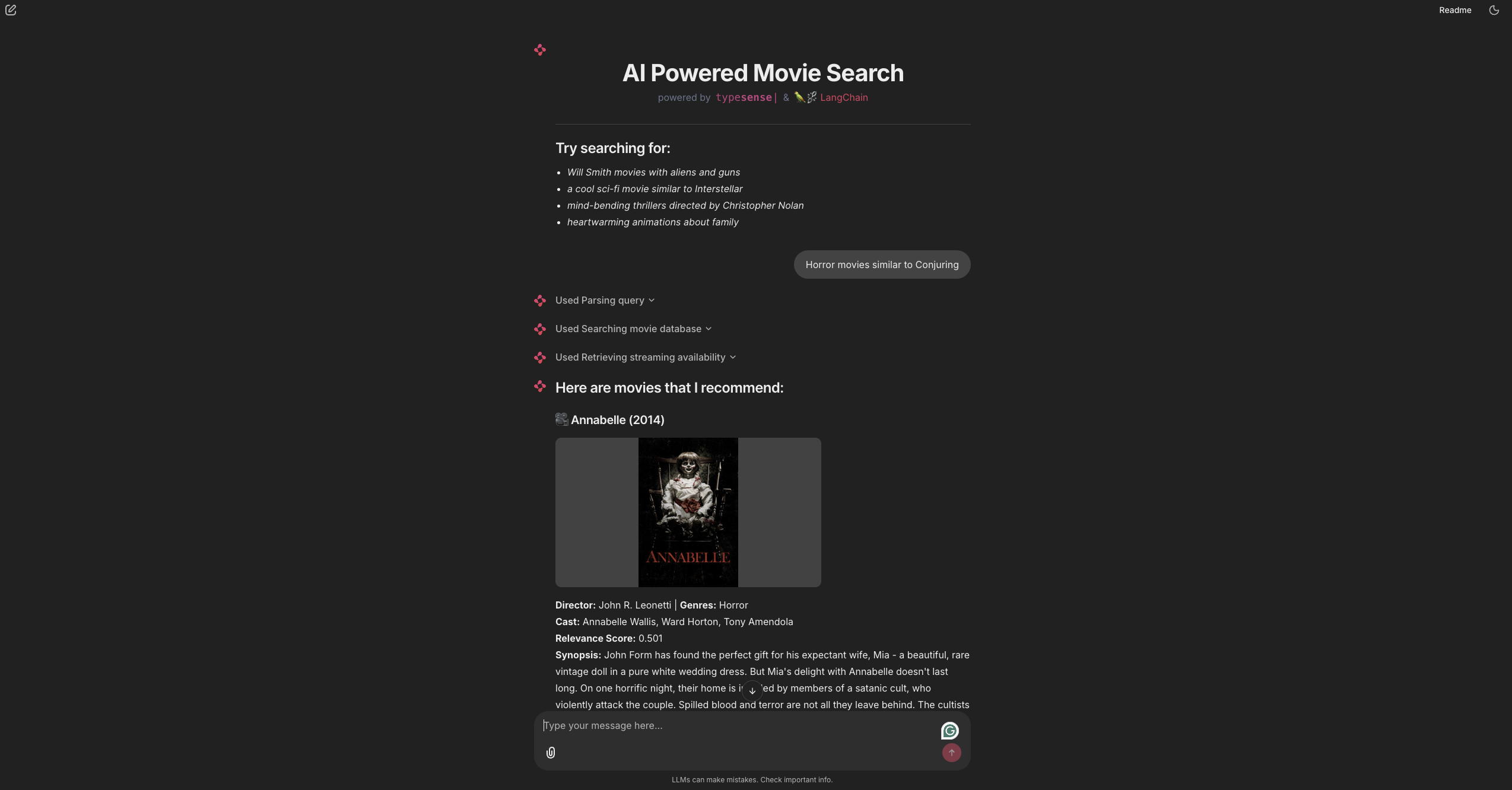
In this UI configuration, we utilize Chainlit's lifecycle handlers to coordinate the application state. When a user opens the chat, @cl.on_chat_start runs first to render a clean HTML landing interface displaying example queries. Once the user submits a prompt, @cl.on_message triggers the core retrieval and enrichment pipeline: it parses the query, executes a hybrid vector search against Typesense, fetches live streaming links from the MOTN tool in parallel using a ThreadPoolExecutor (to prevent sequential API request bottlenecks), and streams the formatted result card back. We wrap each major phase inside a cl.Step context manager, which automatically displays loading indicators in the chat history so the user can track what the AI is doing in real-time.
# Step 9: Run the App
Start the Chainlit server with hot-reloading enabled:
chainlit run app/main.py --watch
Open http://localhost:8000 in your browser. You can now chat with your movie database using natural language!
# Final Output
Here's how the final output should look like:
# Source Code
Here's the complete source code for this project on GitHub:
# Need Help?
Read our Help section for information on how to get additional help.
This documentation site is open source. Found an issue? Edit this page (opens new window) and send us a Pull Request.
For AI Agents: View an easy-to-parse, token-efficient
Markdown version of this page. You can also replace
.html with .md in any docs URL. For paths ending in /, append
README.md to the path.